
Once you have activated your GPS tracker, it should appear on your tracking portal as a basic marker on the map. Once it has appeared you are able to assign additional values to the device to make identification easier - such as registration, driver name etc.
Assigning vehicle details
To assign additional values please begin by navigating to the "My account" tab along the top of your tracking portal.
Your vehicle should appear in the "My vehicles" listing towards the bottom of the page, in order to edit the values on this device find and click the link "edit" to the right of the appropriate vehicle.
Once you have selected edit, you will have the ability to enter values into the custom fields against the vehicle;
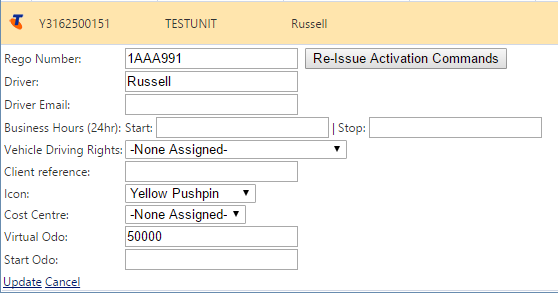
Once you have finished, please click "update" at the bottom of the form
Comments
0 comments
Please sign in to leave a comment.