
There are many reasons that one of your tracking devices may not be responding, and by following this guide we can help to eliminate these reasons one at a time in order to get you back up and tracking as quickly as possible
Important: Device tampering
Device tampering is a very real problem encountered by many customers. Prior to progressing with troubleshooting please be sure that your device has not been disconnected or tampered with in any manner.
Device Activation
Prior to proceeding with any of the items below, if you have installed a new device and it is not visible on your tracking portal - please ensure it has been activated
Link: Activating new hardware
Device Power
The first steps that should be taken is to inspect the hardware for power - you will be able to identify the status of the device by locating the power indicator LED's on the device (You are looking for a solid green LED light indicator).
Device power is typically the number one cause of devices not responding. This may be something as simple as device disconnection, loose/faulty wiring or a blown fuse.
If the device has no power, please resolve this issue and confirm connectivity. If you are unable to get a any lights illuminated on the device however have confirmed power is satisfactory please contact Fleetdynamics for further assistance.
Network Connectivity
If your device has power, however is still failing to report updates the next step is to confirm connectivity to the mobile operators network. Your GPS tracking device communicates via a built in SIM card and failure to connect to the mobile network will cause the hardware to no longer track.
All Fleetdynamics hardware has a LED light indicating mobile network connectivity. This is a blue light located next to the power indicator. When network connectivity is available this LED will be flashing blue.
If your device is inside a mobile coverage area, however has no flashing blue LED please contact Fleetdynamics for further assistance.
GPS Signal
Provided your equipment has both power, and mobile network connectivity however is still failing to update on the tracking portal the next step is to ensure GPS satellite signal. Satellite signal strength is harder to confirm, however you can ensure this is not a concern by moving the equipment out of the way of any metallic objects, such as sheet metal. If the vehicle is inside a building or shed, please move it outside.
Where possible, locating the device with a clear view of the sky is best practice. If the GPS tracking device is installed inside an building such as a shipping container, the chances of the device receiving a GPS signal are very small.
If you wish to confirm the strength of the GPS tracking signal, you can view this via the "Live tracking" screen on the portal by clicking the appropriate vehicles icon
Prolonged power loss
If your device has experienced prolonged loss of mains power, such as disconnection or flat battery - you may be required to manually request re-activation of the equipment. This can be performed via your "My Account " tab, by finding the vehicle in the vehicle listing, and clicking the "edit" link. If the device has been offline for longer than 24 hrs there will be a button visible labeled "Re-issue Activation Commands".
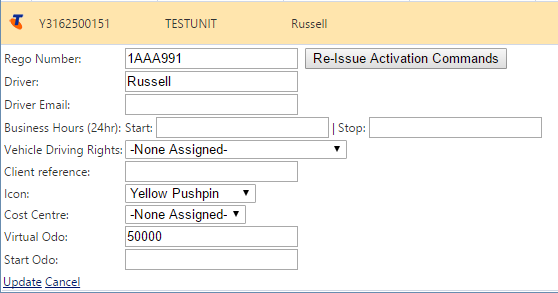
By pressing this button the device will be issued initialization sequence and if all other items above are addressed this may bring the device back online.
What Next?
If none of the above helped you get your equipment back online, please contact Fleetdynamics support for further assistance
Link: Contact Fleetdynamics
Comments
0 comments
Please sign in to leave a comment.